> For the complete documentation index, see [llms.txt](https://docs.defituna.com/llms.txt). Markdown versions of documentation pages are available by appending `.md` to page URLs; this page is available as [Markdown](https://docs.defituna.com/dive-into-defituna/provide-liquidity/platform-info/trigger-orders.md).
# Trigger Orders
{% hint style="danger" %}
During periods of high congestion on the Solana network, Trigger Orders may require multiple attempts to execute. \
Please note that execution is not guaranteed, as Solana remains in Beta and our systems are continuously being optimized to deliver the best possible user experience.
{% endhint %}
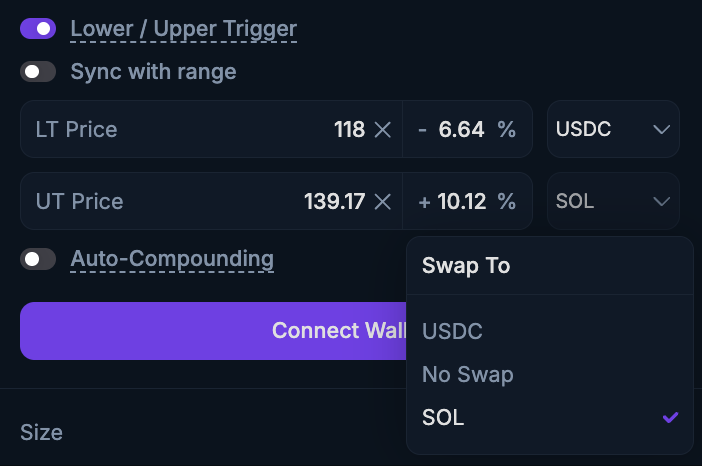
You can set Trigger Orders, which can function as Stop-Loss or Take-Profit orders, in two ways:
* During position opening: Enable **"Lower / Upper Triggers"**.
* For an existing position: Use the **“LT /** **UT”** icon on the dashboard as mentioned [here](/dive-into-defituna/provide-liquidity/onboarding/monitoring-opened-lp-positions.md).
A **Lower Trigger (LT)** places an order below the current price and helps to limit losses or secure gains by automatically closing your position once the price drops to or below the LT trigger. \
This trigger order is placed under the "LT" order.
A **Upper Trigger (UT)** places an order above the current price and helps to limit losses or secure gains by automatically closing your position once the price rises to or above the UT trigger. \
This trigger order is placed above the "UT" order.
Above is an example on the SOL/USDC pair. The liquidation price is $74.26, and the lower trigger order is set at $75.00.\
This setup is considered risky during high volatility, as the price may quickly drop through both your limit order and the liquidation point, resulting in liquidation before the trigger order is executed.
{% hint style="danger" %}
**Best practice:** avoid placing trigger orders too close to your liquidation price. \
Execution is not guaranteed, and you may still be liquidated before the order is executed.
{% endhint %}
Once LT/UT order is created, it appears under the **"**[**Positions**](/dive-into-defituna/provide-liquidity/onboarding/monitoring-opened-lp-positions.md)**"** table. If not immediately visible, you may need to enable it via the column filter. You can adjust the trigger price from this table at any time. LT/UT orders trigger full position closure only (partial closures are not yet supported).
When a position is closed (manually or via LT/UT), all associated trigger orders are automatically cancelled. A fee on the notional value of the position is charged for any executed LT/UT order and can be found in the pool stats under **Protocol Fee**.
**Trigger Orders Swap**
To enhance risk management and provide users with greater flexibility, DefiTuna allows you to choose which token your position will be swapped into when a trigger order is executed.\
This feature ensures a predictable and customizable outcome, matching your desired risk profile.
{% hint style="info" %}
Trigger orders are processed via **Jupiter** to improve execution and minimize price impact on the pool.
{% endhint %}